A dropped video call from the home office, a lagging point-of-sale system, or Wi-Fi that quits at the far bedroom usually is not an internet-plan problem. It is often a wiring problem. The right network wiring options give your devices a dependable path back to the router, switch, or server instead of asking every phone, camera, television, and laptop to fight for the same wireless signal.
For Central Florida homes and businesses, the best answer depends on how the space is used, how far signals need to travel, what walls are open, and whether the system needs room to grow. There is no reason to overbuild a small home network, but there is also no reason to install cable that will be outdated before the paint dries. Straight answers start with understanding what each option actually does.
The Main Network Wiring Options
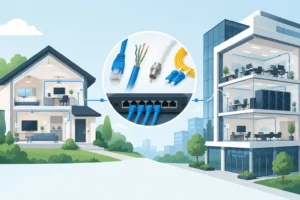
Most permanent network installations use twisted-pair Ethernet cable, fiber optic cable, or a combination of wired connections and professionally placed wireless access points. Each has a place. The goal is not to fill a building with cable for the sake of it. The goal is to get reliable coverage and enough capacity where people work, stream, communicate, and manage security.
Cat5e: Still Useful for Basic Needs
Cat5e is an older Ethernet cable that can support gigabit network speeds over standard residential and office distances. For a modest setup with a few computers, smart TVs, and printers, it can still do the job.
The trade-off is future capacity. If walls are already open for a renovation or new construction project, installing Cat5e to save a little money now can create a bigger expense later. It is usually better reserved for existing runs that are tested and performing well, not as the first choice for a new structured wiring project.
Cat6: The Practical Choice for Most Properties
Cat6 is often the best fit for modern homes, small offices, retail spaces, and rental properties. It supports gigabit networking easily and can handle higher speeds over shorter distances. It is a solid choice for wired desktop connections, gaming systems, smart TVs, network printers, access points, and many security camera systems.
For most homeowners, Cat6 hits the right balance between cost and long-term value. If you are adding a network outlet to a home office or running cable to a media room, it is usually the sensible answer. No upselling, no drama – just cable that is appropriate for the job.
Cat6A: Better for Higher Demands and Longer Runs
Cat6A is designed for 10-gigabit speeds across longer runs than Cat6. It is thicker, less flexible, and generally costs more to install, but that added capability can make sense in larger homes, commercial spaces, medical offices, production environments, and buildings with heavier data needs.
It is also worth considering when a project includes multiple high-powered wireless access points, large file transfers, servers, or a growing number of connected devices. A business does not need Cat6A at every desk just because it is available. But using it for backbone runs, server rooms, or planned high-demand areas can be a smart move.
Fiber Optic Cable: Best for Distance and Backbone Capacity
Fiber carries data with light rather than electrical signals. That makes it especially useful for long distances, separate buildings, and high-capacity backbone connections. A property with a detached garage, guest house, warehouse, gatehouse, or outbuilding may benefit from fiber instead of copper Ethernet.
Fiber is not affected by electrical interference the way copper can be, and it avoids the grounding concerns involved with running copper between buildings. It does require compatible equipment and more specialized installation practices. For a simple bedroom outlet, fiber is unnecessary. For connecting a main office to a separate building or supporting a serious commercial network, it may be the right call.
Wired Connections and Wi-Fi Work Better Together
Wi-Fi is convenient, but it is not a replacement for every wired connection. Wireless signals weaken through concrete block, metal framing, tile, plumbing, appliances, and dense walls. Central Florida homes often have construction features that make a router placed in one corner of the house a poor plan for whole-home coverage.
The better approach is often to wire the devices that need dependable performance, then use Ethernet to feed wireless access points in the areas where phones, tablets, and laptops are used. This gives you strong Wi-Fi coverage without relying on repeaters that may cut performance or create inconsistent connections.
A wired connection makes sense for stationary equipment such as desktop computers, televisions, gaming consoles, printers, network video recorders, and many smart-home hubs. It also matters for access points and security cameras, particularly when cameras use Power over Ethernet, or PoE. PoE allows one cable to provide both data and power, reducing the need for a nearby electrical outlet.
Don’t Confuse Convenience Options With Permanent Wiring
Some products can extend a network without opening walls, but they are not equal to a properly installed cable run. They may be useful in the right situation, especially when a tenant or homeowner needs a short-term answer.
Mesh Wi-Fi can improve coverage, but wireless mesh units still depend on a signal path between them unless they have a wired backhaul. Powerline adapters use a building’s electrical wiring to carry data, and results can vary widely based on the electrical system, circuit layout, and interference. MoCA adapters can use existing coaxial cable and may perform well in homes with suitable coax runs.
These options can solve a specific problem, but they should not be presented as magic. If a business relies on its network for payments, phones, cameras, or daily operations, permanent low-voltage wiring is usually the more accountable solution.
Plan the Network Before the Walls Close
The best time to run cable is before drywall goes up, during a remodel, or while other electrical work has opened access to ceilings and walls. That does not mean an existing home cannot be wired. It can. It simply means the route needs more careful planning to keep the work clean and avoid unnecessary wall repairs.
Start by identifying where internet service enters the property and where the main network equipment will live. A central, ventilated location with access to power is better than stuffing a modem and switch into a crowded closet with no thought for heat, service access, or future equipment.
Then think about actual use, not just today’s devices. A new office may need two Ethernet ports instead of one. A television wall may need connections for a TV, streaming device, game console, and future equipment. A ceiling-mounted access point needs a cable in the ceiling, while exterior cameras need planned routes that protect the cable from weather and physical damage.
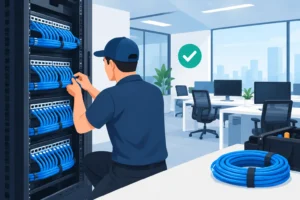
For larger projects, labeling matters. Every cable should be identified at both ends and terminated properly at a patch panel, wall plate, or rated enclosure. A pile of unlabeled cables may technically work on day one, but it turns a simple future change into a guessing game.
What a Professional Network Wiring Installation Should Include
Good network work is more than pulling cable through a wall. The cable type must suit the use, runs must be routed safely, bends must stay within acceptable limits, and terminations need to be done correctly. Poor terminations and damaged cable can cause intermittent issues that are frustrating to diagnose later.
A proper installation also keeps low-voltage network cable separated from power wiring where required and practical. That helps reduce interference and protects the integrity of the installation. In commercial settings, routing, fire-rated pathways, ceiling access, equipment racks, and local code requirements may all affect the plan.
Testing should not be skipped. Each installed run should be checked so there is a clear answer before furniture is moved back or equipment is connected. If something is not right, it should be addressed while the work area is still accessible, not blamed on the internet provider weeks later.
Choosing the Right Setup for Your Property
A small home office may only need Cat6 to the desk and a better location for the wireless access point. A larger home may benefit from multiple wired access points, connections at TV locations, and PoE camera runs. A restaurant, office, retail location, or managed property may need dedicated runs for workstations, payment equipment, phones, access points, cameras, and network racks.
The right design comes from a site-specific conversation. How many devices need wired reliability? Are there detached structures? Are walls open? Is this a short-term repair, a remodel, or a long-term property improvement? Those answers determine whether Cat6, Cat6A, fiber, or a mixed system makes financial sense.
VoltIQ Electrical Contractor helps Central Florida property owners plan and install network wiring with the same approach used for electrical work: clear scope, upfront pricing before work begins, and communication from a local team instead of a call center. If you are investing in a network upgrade, ask for a plan that matches how your property actually operates – not a one-size-fits-all package.